

-
- Recall-AI is a mobile application designed for phones and tablets that provides cognitive therapy for patients suffering from ALS and dementia by engaging their motor and memory skills. Leveraging the power of artificial intelligence, it transforms these exercises into enjoyable games. Your purchase helps us to continue adding features that combat loss of motor & memory skills, and prepare for FDA approval, join the fight to improve the cognitive skills that ALS / Dementia attacks, and share our project with others who could benefit!
- Up to 5 family members and a Clinician can be a part of the patients care team and actively participate in improving their cognitive motor and memory skills. Imagine being able to partake in your loved ones treatment without the travel requirement.!
- Throughout the day, Recall gently prompts the patient to participate in various exercises, meticulously recording all results for review by healthcare professionals.
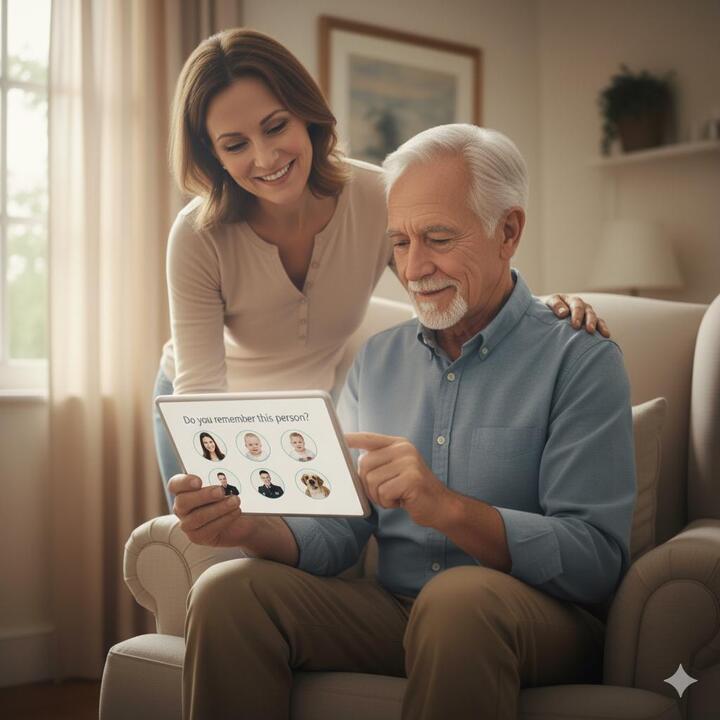
- Family members receive reminders 3 to 5 times a day to share a meaningful memory with their loved one. These memories can take the form of a photo, a song, a video, a Bible passage, an excerpt from a favorite book, or even a voice note. The AI enhances these memories as needed, incorporating related objects or images to assist. If the patient is unable to respond within five seconds or provides an incorrect answer, the correct response is revealed.
- Recall is centered around the caregiver, empowering them to create an unlimited number of daily memory challenges that help patients focus on specific memory difficulties, such as “Where am I?”, “What is my room number?”, “Do you know where the bathroom is?”, and “What is today’s date?”, among others.
- The motor skills exercises included in Recall are based on established industry standards that have proven effective in stimulating improvements in motor skills.
- We're raising funds through Founding Member subscription pre-sales and the opportunity to join our Beta Testing Group.
Products
Memory Training App: Cognitive Games for Seniors & ALS / Dementia Support. Beta Testing allows up to 5 family members to partake in their loved ones care plan along with a clinician.
1. Caregiver-Centric Features (The "Control Panel")This app provides tools that help the caregiver organize, track, and manage the patient's entire world.* Customizable Content & Personalization: The app must allow caregivers to upload personal media (photos, family videos, favorite music, or even the patient's own clothing images). Generic games fail quickly; personalization is key to triggering genuine recall and engagement.* Remote Tracking & Reporting: Caregivers need to monitor usage and progress (or decline) from a distance.* Activity Logs: Track which games/activities were used, for how long, and if the patient showed agitation or engagement.* Goal Customization: Allow the caregiver (or clinician) to set specific goals (e.g., "Practice naming 5 family members") and track task completion.* Reminder & Daily Task Management:* Digital Calendar/Task List: Systems that allow the caregiver to input simple, repetitive tasks (e.g., "Take medication," "Call Daughter") and push them to the patient's screen as clear, visual prompts.* "It's Done!" Confirmation: A feature that provides positive reinforcement (like a sound or vibration) when the patient successfully completes a task or checklist item, building confidence.* Dyadic Communication Tools: Features that facilitate conversation between the patient and caregiver:* Voice Recording: The ability for a family member to record their voice describing a photo or giving instructions.* Simple Quizzes/Visual Prompts: Over a thousand quiz questions and images designed to tap into past memories and spark conversation.*Unlimited AI message generation
*Unlimited reels, eye-tracking, EHR API, weekly clinical reports
🕹️ 2. User Interface (UI) Design for ImpairmentFunctionality is worthless if the interface frustrates the patient!| Simplicity & Contrast | High Contrast Colors (e.g., stark white text on a dark background); Avoid light, pastel colors. | Compensates for vision impairment and reduced light sensitivity. || Large, Sparse Elements | Large Buttons and Icons with ample spacing between them. Large Text Size and minimal text density. | Compensates for tremor, reduced fine motor control, and difficulty reading dense text. |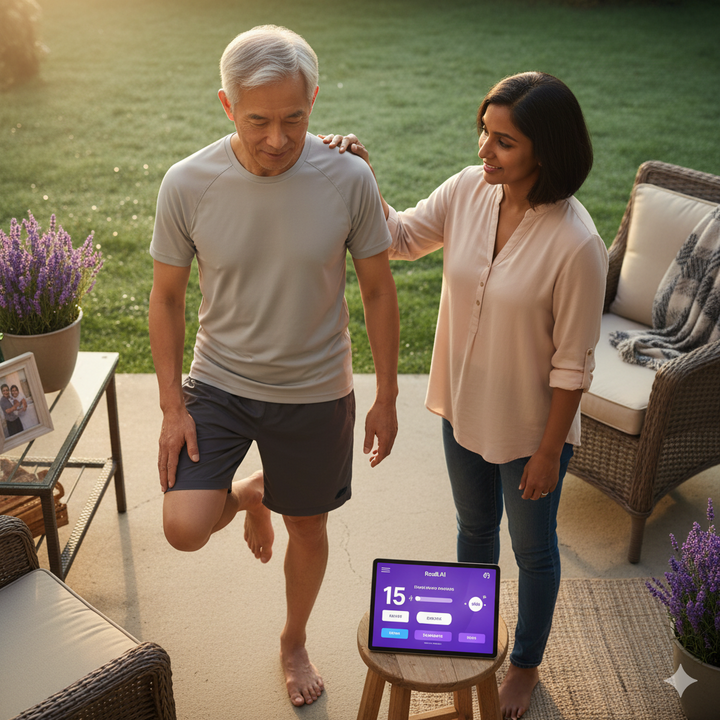
Memory Training App: Cognitive Games for Seniors & ALS / Dementia Support. Discounted Annual Subscription - Save 20% off the Pro Plan normal price of $1,200 per year - ONLY AVAILABLE DURING BETA TESTING SIGN-UP. Subscriptions will start the week of 5Jan2026. Pro Plan subscriptions include licenses for up to 5 family members and 1 member of the Care Team. ALS and "Spaced Retrieval" memory exercises.
1. Caregiver-Centric Features (The "Control Panel")This app provides tools that help the caregiver organize, track, and manage the patient's entire world.* Customizable Content & Personalization: The app must allow caregivers to upload personal media (photos, family videos, favorite music, or even the patient's own clothing images). Generic games fail quickly; personalization is key to triggering genuine recall and engagement.* Remote Tracking & Reporting: Caregivers need to monitor usage and progress (or decline) from a distance.* Activity Logs: Track which games/activities were used, for how long, and if the patient showed agitation or engagement.* Goal Customization: Allow the caregiver (or clinician) to set specific goals (e.g., "Practice naming 5 family members") and track task completion.* Reminder & Daily Task Management:* Digital Calendar/Task List: Systems that allow the caregiver to input simple, repetitive tasks (e.g., "Take medication," "Call Daughter") and push them to the patient's screen as clear, visual prompts.* "It's Done!" Confirmation: A feature that provides positive reinforcement (like a sound or vibration) when the patient successfully completes a task or checklist item, building confidence.* Dyadic Communication Tools: Features that facilitate conversation between the patient and caregiver:* Voice Recording: The ability for a family member to record their voice describing a photo or giving instructions.* Simple Quizzes/Visual Prompts: Over a thousand quiz questions and images designed to tap into past memories and spark conversation.*Unlimited AI message generation
*Unlimited reels, eye-tracking, EHR API, weekly clinical reports
🕹️ 2. User Interface (UI) Design for ImpairmentFunctionality is worthless if the interface frustrates the patient!| Simplicity & Contrast | High Contrast Colors (e.g., stark white text on a dark background); Avoid light, pastel colors. | Compensates for vision impairment and reduced light sensitivity. || Large, Sparse Elements | Large Buttons and Icons with ample spacing between them. Large Text Size and minimal text density. | Compensates for tremor, reduced fine motor control, and difficulty reading dense text. || Intuitive Icons | Icons must be intuitive and familiar; avoid technical jargon or homonyms. | Reduces cognitive load and prevents confusion (a core function of the app is to reduce confusion). || No Interruptions | Absolutely no pop-up advertisements. | Pop-ups cause acute confusion, frustration, and often lead to the abandonment of the app.

Memory Training App: Cognitive Games for Seniors & ALS / Dementia Support. Discounted Annual Subscription - Save 20% off the normal price of $49per month forever. - ONLY AVAILABLE DURING BETA TESTING SIGN-UP. Subscriptions will start the week of 5Jan2026. All subscriptions include licenses for up to 5 family members and 1 member of the Care Team. ALS and "Spaced Retrieval" memory exercises.
1. Caregiver-Centric Features (The "Control Panel")This app provides tools that help the caregiver organize, track, and manage the patient's entire world.* Customizable Content & Personalization: The app must allow caregivers to upload personal media (photos, family videos, favorite music, or even the patient's own clothing images). Generic games fail quickly; personalization is key to triggering genuine recall and engagement.* Remote Tracking & Reporting: Caregivers need to monitor usage and progress (or decline) from a distance.* Activity Logs: Track which games/activities were used, for how long, and if the patient showed agitation or engagement.* Goal Customization: Allow the caregiver (or clinician) to set specific goals (e.g., "Practice naming 5 family members") and track task completion.* Reminder & Daily Task Management:* Digital Calendar/Task List: Systems that allow the caregiver to input simple, repetitive tasks (e.g., "Take medication," "Call Daughter") and push them to the patient's screen as clear, visual prompts.* "It's Done!" Confirmation: A feature that provides positive reinforcement (like a sound or vibration) when the patient successfully completes a task or checklist item, building confidence.* Dyadic Communication Tools: Features that facilitate conversation between the patient and caregiver:* Voice Recording: The ability for a family member to record their voice describing a photo or giving instructions.* Simple Quizzes/Visual Prompts: Over a thousand quiz questions and images designed to tap into past memories and spark conversation.* This plan includes the patient and up to 3 family members.
🕹️ 2. User Interface (UI) Design for ImpairmentFunctionality is worthless if the interface frustrates the patient!| Simplicity & Contrast | High Contrast Colors (e.g., stark white text on a dark background); Avoid light, pastel colors. | Compensates for vision impairment and reduced light sensitivity. || Large, Sparse Elements | Large Buttons and Icons with ample spacing between them. Large Text Size and minimal text density. | Compensates for tremor, reduced fine motor control, and difficulty reading dense text. || Intuitive Icons | Icons must be intuitive and familiar; avoid technical jargon or homonyms. | Reduces cognitive load and prevents confusion (a core function of the app is to reduce confusion). || No Interruptions | Absolutely no pop-up advertisements. | Pop-ups cause acute confusion, frustration, and often lead to the abandonment of the app.
Memory Training App: Cognitive Games for Seniors & ALS / Dementia Support. Beta Testing allows up to 5 family members to partake in their loved ones care plan along with a clinician.
1. Caregiver-Centric Features (The "Control Panel")This app provides tools that help the caregiver organize, track, and manage the patient's entire world.* Customizable Content & Personalization: The app must allow caregivers to upload personal media (photos, family videos, favorite music, or even the patient's own clothing images). Generic games fail quickly; personalization is key to triggering genuine recall and engagement.* Remote Tracking & Reporting: Caregivers need to monitor usage and progress (or decline) from a distance.* Activity Logs: Track which games/activities were used, for how long, and if the patient showed agitation or engagement.* Goal Customization: Allow the caregiver (or clinician) to set specific goals (e.g., "Practice naming 5 family members") and track task completion.* Reminder & Daily Task Management:* Digital Calendar/Task List: Systems that allow the caregiver to input simple, repetitive tasks (e.g., "Take medication," "Call Daughter") and push them to the patient's screen as clear, visual prompts.* "It's Done!" Confirmation: A feature that provides positive reinforcement (like a sound or vibration) when the patient successfully completes a task or checklist item, building confidence.* Dyadic Communication Tools: Features that facilitate conversation between the patient and caregiver:* Voice Recording: The ability for a family member to record their voice describing a photo or giving instructions.* Simple Quizzes/Visual Prompts: Over a thousand quiz questions and images designed to tap into past memories and spark conversation.*Unlimited AI message generation
*Unlimited reels, eye-tracking, EHR API, weekly clinical reports
🕹️ 2. User Interface (UI) Design for ImpairmentFunctionality is worthless if the interface frustrates the patient!| Simplicity & Contrast | High Contrast Colors (e.g., stark white text on a dark background); Avoid light, pastel colors. | Compensates for vision impairment and reduced light sensitivity. || Large, Sparse Elements | Large Buttons and Icons with ample spacing between them. Large Text Size and minimal text density. | Compensates for tremor, reduced fine motor control, and difficulty reading dense text. |
Memory Training App: Cognitive Games for Seniors & ALS / Dementia Support. Discounted Annual Subscription - Save 20% off the Pro Plan normal price of $1,200 per year - ONLY AVAILABLE DURING BETA TESTING SIGN-UP. Subscriptions will start the week of 5Jan2026. Pro Plan subscriptions include licenses for up to 5 family members and 1 member of the Care Team. ALS and "Spaced Retrieval" memory exercises.
1. Caregiver-Centric Features (The "Control Panel")This app provides tools that help the caregiver organize, track, and manage the patient's entire world.* Customizable Content & Personalization: The app must allow caregivers to upload personal media (photos, family videos, favorite music, or even the patient's own clothing images). Generic games fail quickly; personalization is key to triggering genuine recall and engagement.* Remote Tracking & Reporting: Caregivers need to monitor usage and progress (or decline) from a distance.* Activity Logs: Track which games/activities were used, for how long, and if the patient showed agitation or engagement.* Goal Customization: Allow the caregiver (or clinician) to set specific goals (e.g., "Practice naming 5 family members") and track task completion.* Reminder & Daily Task Management:* Digital Calendar/Task List: Systems that allow the caregiver to input simple, repetitive tasks (e.g., "Take medication," "Call Daughter") and push them to the patient's screen as clear, visual prompts.* "It's Done!" Confirmation: A feature that provides positive reinforcement (like a sound or vibration) when the patient successfully completes a task or checklist item, building confidence.* Dyadic Communication Tools: Features that facilitate conversation between the patient and caregiver:* Voice Recording: The ability for a family member to record their voice describing a photo or giving instructions.* Simple Quizzes/Visual Prompts: Over a thousand quiz questions and images designed to tap into past memories and spark conversation.*Unlimited AI message generation
*Unlimited reels, eye-tracking, EHR API, weekly clinical reports
🕹️ 2. User Interface (UI) Design for ImpairmentFunctionality is worthless if the interface frustrates the patient!| Simplicity & Contrast | High Contrast Colors (e.g., stark white text on a dark background); Avoid light, pastel colors. | Compensates for vision impairment and reduced light sensitivity. || Large, Sparse Elements | Large Buttons and Icons with ample spacing between them. Large Text Size and minimal text density. | Compensates for tremor, reduced fine motor control, and difficulty reading dense text. || Intuitive Icons | Icons must be intuitive and familiar; avoid technical jargon or homonyms. | Reduces cognitive load and prevents confusion (a core function of the app is to reduce confusion). || No Interruptions | Absolutely no pop-up advertisements. | Pop-ups cause acute confusion, frustration, and often lead to the abandonment of the app.
Memory Training App: Cognitive Games for Seniors & ALS / Dementia Support. Discounted Annual Subscription - Save 20% off the normal price of $49per month forever. - ONLY AVAILABLE DURING BETA TESTING SIGN-UP. Subscriptions will start the week of 5Jan2026. All subscriptions include licenses for up to 5 family members and 1 member of the Care Team. ALS and "Spaced Retrieval" memory exercises.
1. Caregiver-Centric Features (The "Control Panel")This app provides tools that help the caregiver organize, track, and manage the patient's entire world.* Customizable Content & Personalization: The app must allow caregivers to upload personal media (photos, family videos, favorite music, or even the patient's own clothing images). Generic games fail quickly; personalization is key to triggering genuine recall and engagement.* Remote Tracking & Reporting: Caregivers need to monitor usage and progress (or decline) from a distance.* Activity Logs: Track which games/activities were used, for how long, and if the patient showed agitation or engagement.* Goal Customization: Allow the caregiver (or clinician) to set specific goals (e.g., "Practice naming 5 family members") and track task completion.* Reminder & Daily Task Management:* Digital Calendar/Task List: Systems that allow the caregiver to input simple, repetitive tasks (e.g., "Take medication," "Call Daughter") and push them to the patient's screen as clear, visual prompts.* "It's Done!" Confirmation: A feature that provides positive reinforcement (like a sound or vibration) when the patient successfully completes a task or checklist item, building confidence.* Dyadic Communication Tools: Features that facilitate conversation between the patient and caregiver:* Voice Recording: The ability for a family member to record their voice describing a photo or giving instructions.* Simple Quizzes/Visual Prompts: Over a thousand quiz questions and images designed to tap into past memories and spark conversation.* This plan includes the patient and up to 3 family members.
🕹️ 2. User Interface (UI) Design for ImpairmentFunctionality is worthless if the interface frustrates the patient!| Simplicity & Contrast | High Contrast Colors (e.g., stark white text on a dark background); Avoid light, pastel colors. | Compensates for vision impairment and reduced light sensitivity. || Large, Sparse Elements | Large Buttons and Icons with ample spacing between them. Large Text Size and minimal text density. | Compensates for tremor, reduced fine motor control, and difficulty reading dense text. || Intuitive Icons | Icons must be intuitive and familiar; avoid technical jargon or homonyms. | Reduces cognitive load and prevents confusion (a core function of the app is to reduce confusion). || No Interruptions | Absolutely no pop-up advertisements. | Pop-ups cause acute confusion, frustration, and often lead to the abandonment of the app.
